PREREQUISITES:
- Time: 90s
- Access: Sidekick AI
- Plan: Grow / Advanced / Plus
The “RTO” Profit Killer
Have you ever celebrated a high-revenue day, only to realize a week later that 20% of those orders were Returned to Origin (RTO)? For merchants—especially those offering Cash on Delivery (COD)—a sale isn’t a sale until the package is delivered. Between double shipping fees, restocking labor, and burnt ad spend, RTO can turn a “profitable” campaign into a massive loss. If you aren’t tracking your Net ROAS, you’re flying blind.
The Solution: Sidekick It
Today, we’re using Shopify Sidekick to build a custom RTO Dashboard. This app creates a central command center to identify your “Hotspots”—the specific products, zip codes, and payment methods costing you money. By correlating your returns with actual shipping costs, you can finally see your true profitability without exporting a single spreadsheet.
The Exact Prompt
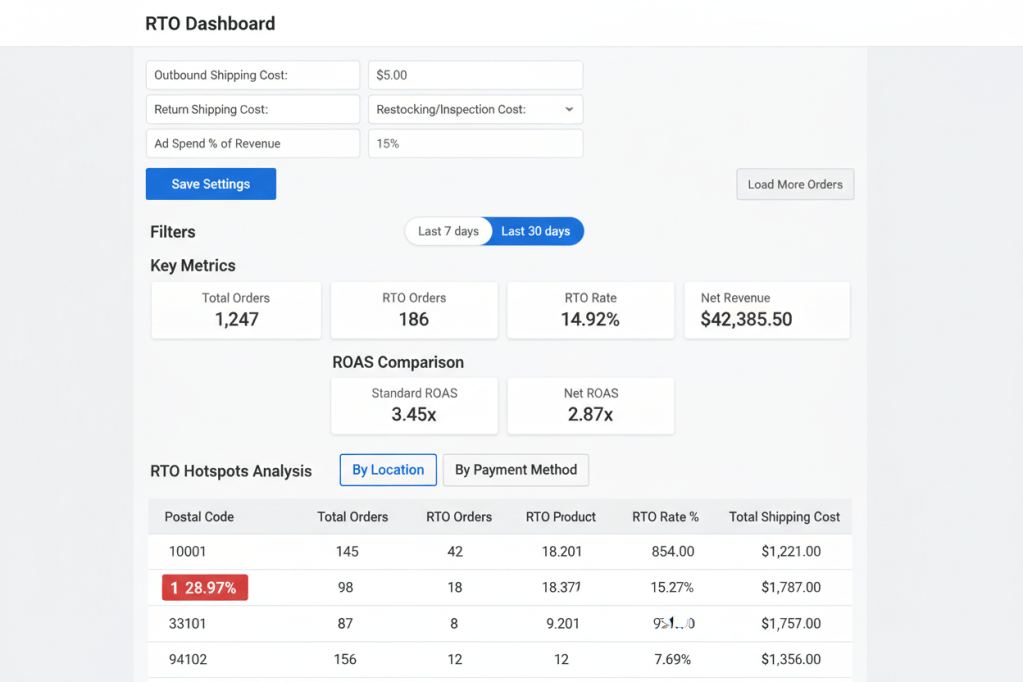
Create a brand new app called "RTO Dashboard" to track Return to Origin rates and true profitability.The app should:Display a Main Metrics bar: Total RTO %, Total Orders, Net Revenue, and a side-by-side comparison of Standard ROAS vs. Net ROAS.Include a Hotspot Analysis section with three tabs:"By Location": Table showing postal codes, RTO rates, and total shipping costs. Highlight zones >20% RTO in red."By Product": Table showing SKUs with RTO rates and net profit per SKU. Flag items >30% RTO."By Payment Method": Compare COD vs. Prepaid RTO rates and Average Order Value.Logic:Use orders tagged with "RTO" to identify failed deliveries.Allow user to input default costs: Outbound Shipping, Return Shipping, and Restocking fees.Calculate Net ROAS: (Revenue - Returns - Reverse Logistics Costs) / Ad Spend.Include Date Range filters (7, 30, 90 days).Keep the UI clean using Shopify Polaris components.
Highlight the prompt above and copy it to your clipboard to start your Sidekick build.
Key Features of Your New App
- True Profit Metrics: Automatically calculates Net ROAS, accounting for shipping losses and restocking fees.
- Hotspot Identification: Instantly isolate high-risk zip codes to optimize your shipping zones or COD availability.
- Product Quality Audit: Spot “problem children” in your catalog that look like bestsellers but have unsustainable return rates.
- Payment Comparison: Hard data to help you decide if the volume from COD is worth the cost of the returns.
Technical Note: This app relies on the order tag “RTO”. To automate this, set up a Shopify Flow trigger: When Fulfillment Event Created -> If Status is “Returned to Sender” -> Add Order Tag: RTO. This ensures your dashboard stays updated in real-time
Caution: Reverse logistics costs (the return trip) are often higher than outbound costs. Ensure you update your “Cost Settings” in the app regularly to reflect current carrier surcharges for accurate reporting.
TIP: Review the post Monitor Shopify Flow Status with Heartbeat to keep an eye on your RTO tagging
Common Questions
Does this app actually process the refunds for me?.
No. This is an Analytics Dashboard. It identifies where you are losing money so you can make better strategic decisions. Refunds are still handled through the standard Shopify “Orders” screen
Can I track RTO for specific marketing channels?
Yes! By inputting your ad spend for a specific period into the app settings, the dashboard will calculate your Net ROAS against your total order volume for that timeframe.
Is this only useful for COD stores?
Not at all. Even if you don’t offer COD, this tool is vital for identifying “serial returners” or products with sizing/quality issues that are hurting your bottom line.
The Sidekick Challenge: Look at your “By Location” tab. Are there specific zip codes where your RTO is over 25%? Let us know in the comments if you’ve decided to “blacklist” certain zones to save your margins!
 Every Shopify Hero Needs a Sidekick.