
PREREQUISITES:
- Time: 60s
- Access: Sidekick AI
- Plan: Grow / Advanced / Plus
The “Click-and-Wait” Fatigue
Shopify’s native bulk editor is powerful, but it’s a chore when you need to change prices for a single product with 50+ variants. Whether you’re prepping for a flash sale or adjusting for inflation, you shouldn’t have to hunt through columns or wait for massive tables to load just to change a “Large / Red” variant from $20 to $25.
The Solution: Sidekick It
We are sharing a recipe for a Variant Price Updater. This app gives you a focused “Command Center.” You search for a product, see every variant on one screen, and update prices in bulk with a single click. No spreadsheets, no hunting for columns—just fast, secure pricing updates.
The Exact Prompt
Create a brand new Variant Price Updater app. The app should: - Provide BOTH a dropdown menu (loading up to 250 products alphabetically) AND a search field for product selection. - Display all variants for the selected product in a paginated table (100 variants per page). - Show columns for: Checkbox (for selection), Variant name (showing option values like "Small / Red"), Current Price, New Price input field. Logic:- Allow users to select multiple variants and enter new prices. - Include an "Update Prices" button that uses the productVariantsBulkUpdate mutation to update selected variants. - Show success/error messages and refresh the table after updates. - Include separate Help and Share buttons. Keep it simple and functional.
Highlight the prompt above and copy it to your clipboard to start your Sidekick build.
Key Features of Your New Price Updater
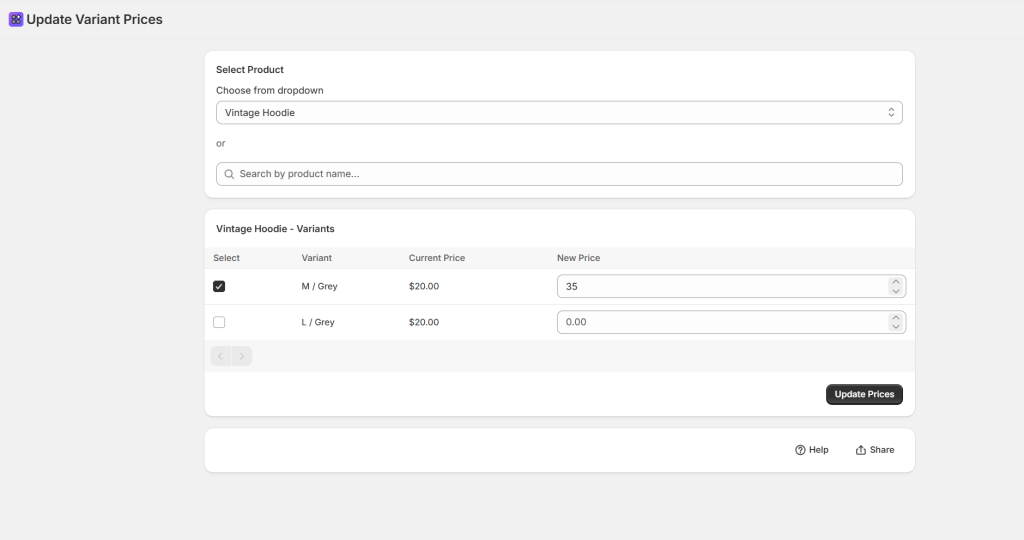
- Dual Selection Mode: Use the search bar for speed or the dropdown to browse alphabetically.
- Bulk Checkboxes: Only want to change the price of the “Extra Large” sizes? Check the boxes you need and leave the rest untouched.
- Paginated for Performance: Even if you have hundreds of variants, the app handles them in 100-per-page chunks to keep things fast.
- Real-Time Refresh: As soon as you hit “Update,” the app confirms the change and refreshes the table so you can see your live prices immediately.
⚠️ Warning: This app uses the
productVariantsBulkUpdatemutation to push changes directly to your live store. Always double-check your “New Price” inputs before clicking Update—especially if you are adjusting high-ticket items!
Common Questions
Can I undo a bulk price change?
There is no “Undo” button; you would simply run the prompt again with the previous prices. We recommend exporting a CSV of your products before any massive pricing overhauls.
Does this update the “Compare-at Price”?
This specific recipe focuses on the Current Price. If you want to handle sales, ask Sidekick: “Add a ‘Compare-at Price’ column to this table and include it in the update mutation.”
Will new prices show up on my store immediately?
Yes! Once the mutation is successful, Shopify’s cache usually updates within seconds for your customers.
The Sidekick Challenge: What’s the biggest “pricing oops” you’ve ever had on your store? Let us know in the comments if this command center helps you sleep better at night!
 Every Shopify Hero Needs a Sidekick.