PREREQUISITES:
- Time To Build: 90 Seconds
- Access Level: Shopify Sidekick + Admin API
- Primary Impact: Conversion Rate (CRO) & SEO Ranking
The “Invisible” Catalog Errors
As your catalog grows, “data decay” sets in. You have products live without images (a conversion killer), variants with zero weight (which breaks your shipping rates at checkout), and empty SEO fields that make you invisible to Google.
Shopify’s native bulk editor is great for changing prices, but it’s terrible at finding what is missing. Manually auditing hundreds of products to find a single missing thumbnail is a waste of your talent.
The Quality Command Center
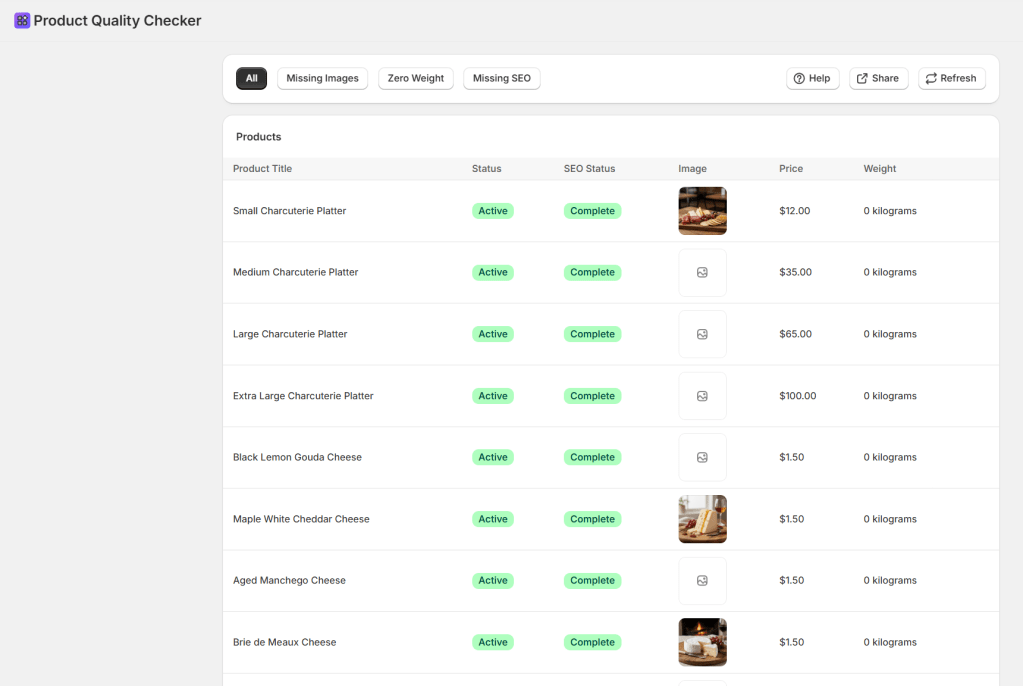
This Blueprint builds a dedicated Product Quality Checker. It acts as a digital scanner for your store, instantly flagging products that are live but incomplete. Instead of clicking through every product page, you get a single-view table with “One-Click Filters” to hunt down missing assets and SEO gaps before they cost you a sale.
The Exact Prompt
Create a 'Product Quality Checker' app to identify catalog issues. Show products in a table with columns for: Title (link to editor), Status (Active/Draft badge), SEO Status (Complete/Missing badge), Image (thumbnail), Price, and Weight.Include 4 Quick-Filter buttons: 1. 'All' (50 per page) 2. 'Missing Images' (filters where image array is empty) 3. 'Zero Weight' (scans variants for 0 weight) 4. 'Missing SEO' (checks for empty description or SEO meta-description).Include a 'Refresh' button to reload data and pagination controls. Add a 'Help' button that opens a modal explaining how to improve weights, images, and SEO descriptions.
Highlight the prompt above and copy it to your clipboard to start your Sidekick build.
How to use your new Command Center
- Missing Images: Instantly isolate products that lack a visual identity. Aim for 3-5 high-quality images per product to boost trust.
- Zero Weight: Identify variants that will cause shipping calculation errors. Accurate weights are the backbone of your logistics.
- SEO Status: View a Green (Complete) or Yellow (Missing) badge for every product. High-quality SEO requires unique descriptions of at least 150 words.
- Direct Access: Click any Product Title to jump straight into the Shopify editor, fix the issue, and return to your dashboard.
Pro-Tip: While this tool is an auditor, it relies on the
write_productsscope to allow future modifications. Always use the Refresh button after making bulk edits to see your “Error List” clear in real-time. Systematically review your catalog page-by-page to ensure 100% data integrity.
Lab Discussion
Why this matters?
Conversion is built on trust. A product without an image or a checkout that crashes because of “Zero Weight” destroys that trust instantly. By building this tool, you’re not just organizing—you’re performing a professional-grade store audit in seconds, ensuring your store functions as well as it looks.
Sidekick Challenge: What’s the biggest data gap you found? Let us know in the comments and we’ll help you customize your Hunter to scan for specific Metafield gaps!
 Every Shopify Hero Needs a Sidekick.