
PREREQUISITES:
- Time: 60s
- Access: Shopify Sidekick AI
- Plan: Grow / Advanced / Plus
The “Dim Weight” Trap
Have you ever been shocked by a shipping invoice that was double what you quoted a customer? Welcome to the world of Dimensional Weight. Carriers like Canada Post, UPS, and FedEx don’t just care how much a box weighs; they care how much space it takes up. If you ship a 1lb pillow in a large box, you’ll be charged for the space, not the weight. If you aren’t tracking Length, Width, and Height, you’re flying blind.
The Solution: Sidekick It
Today, we’re using Shopify Sidekick to build a custom Product Dimensions Manager. This app creates a central dashboard to audit your entire catalog and save dimensions as Metafields—without needing a third-party paid app. By tracking these in Shopify, you can provide accurate data to 3PLs and use advanced apps to calculate exact box fits.
The Exact Prompt
Create a brand new Product Dimensions Manager app. The app should: - Display physical products that require shipping in a table. - Show columns for: Product name, Variant, SKU, Length, Width, Height, Dimension Unit selector (Inches, Centimeters, Meters, Feet), Last Updated, and an Update button. Include filter toggles: 1. "Show only products with missing dimensions" 2. "Hide out of stock products"Logic:- Allow users to enter L, W, and H values and select units. - Store dimensions as custom metafields using the productVariantsBulkUpdate mutation. - Show a "Last Updated" column for tracking modifications.- Include a Share button with instructions in an expandable section. Keep it simple and functional.
Highlight the prompt above and copy it to your clipboard to start your Sidekick build.
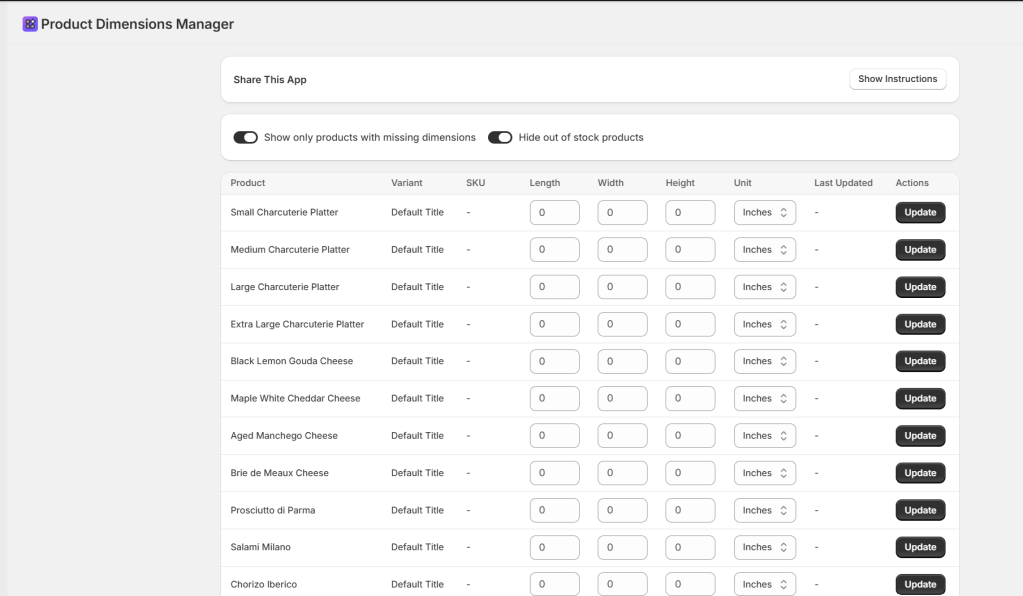
Key Features of Your New App
- Metafield Integration: Automatically creates and updates Metafields in the
sidekicknamespace (length, width, height). - Smart Filtering: Instantly isolate products that are missing data or hide out-of-stock items.
- Bulk-Ready Table: Update your L x W x H and Unit (Inches/CM) on one screen.
- Data Validation: Prevents “fat-finger” typos by ensuring only numbers are entered for dimensions.
⚠️ Technical Note: The data saved by this app is stored as Variant Metafields (Key:
sidekick.length,sidekick.width, etc.). Ensure your shipping or 3PL software is configured to read these specific metafield keys for automated calculations..”
Common Questions
Why store dimensions as Metafields?.
Shopify’s core product fields don’t include L x W x H by default. Metafields are the standard way to store this extra data so other apps and carriers can access it
Sidekick Challenge” question to encourage comments.
Can I change the units later?
Yes! The app includes a unit selector (Inches, CM, etc.). If you switch units, the app will update the sidekick.dimension_unit metafield accordingly.
Is there a limit to how many products I can update?
The productVariantsBulkUpdate mutation is very efficient, but if you have thousands of variants, Sidekick may process them in batches.
The Sidekick Challenge: Check your last UPS or FedEx bill. How much did “Dimensional Weight” cost you this month? Let us know in the comments if this tool helped you bridge the gap!
 Every Shopify Hero Needs a Sidekick.