
PREREQUISITES:
- Time: 60s
- Shopify Sidekick | Plan: Grow/Advanced/Plus
- Impact: High
The “Zero Weight” Silent Killer.
One of the quickest ways to lose money on Shopify isn’t high ad spend—it’s inaccurate shipping weights. Clicking into every single product variant in the Shopify Admin to check a weight field is soul-crushing work. This leads to inaccurate “Free Shipping” triggers and major discrepancies at the post office..
The Solution: Sidekick It
We are “Sidekicking” this task today. This isn’t just a list; it’s a command center. You’ll generate an app that lets you filter for those “0 weight” culprits and update them in a single table—no more opening 50 different tabs.
The Exact Prompt
Create a brand new Product Weight Manager app. The app should: - Display physical products that require shipping in a table. - Show columns for: Product name, Variant, SKU, Weight input field, Unit selector (Grams, Kilograms, Ounces, Pounds), Last Updated, and an Update button. Include two filter toggles: 1. "Show only products with 0 weight" 2. "Hide out of stock products"Logic:- Allow users to update weights using the inventoryItemUpdate mutation. - Query inventoryItem.updatedAt for the timestamp.- Include a Share button with an expandable banner. Keep it simple and functional.
Highlight the prompt above and copy it to your clipboard to start your Sidekick build.
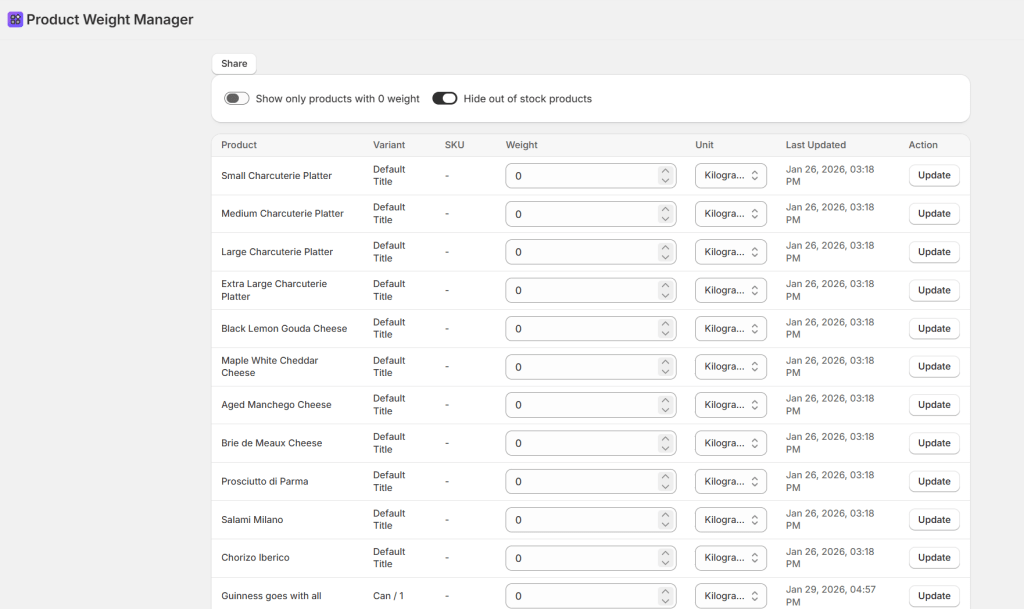
What This App Does
- Audit Your Catalog: Use the “0 weight” toggle to find missing data.
- Focus on What’s Selling: Hide out-of-stock items instantly
- Instant Updates: Save weights and units with one click.
- Track Progress: See the “Last Updated” timestamp pulled directly from Shopify’s API
This prompt uses the
inventoryItemUpdatemutation to change your live store data.We always recommend testing one or two items first to ensure your units are selected correctly.
Common Questions
Why is product weight so important?
It is the backbone of accurate carrier-calculated shipping. Missing weights mean you undercharge and eat the cost
Does this handle packaging weight?
This manages product weight. Set your “Default Package Weight” in Shopify Settings > Shipping and Delivery.
What if I want more columns, like “Profit Margin”?
These apps are iterative! Just ask Sidekick: “Now add a column showing Price and Cost Per Item.”
Did you try this? Drop a comment below and let us know how many “0 weight” items you found lurking in your store!
 Every Shopify Hero Needs a Sidekick.