Tag: Low Code Shopify

  • Kill the Pricing Headache: Build a Bulk Variant Price Updater in 60 Seconds

    Kill the Pricing Headache: Build a Bulk Variant Price Updater in 60 Seconds

    Product Variant Pricing Manager

    PREREQUISITES:

    • Time: 60s
    • Access: Sidekick AI
    • Plan: Grow / Advanced / Plus

    The “Click-and-Wait” Fatigue

    Shopify’s native bulk editor is powerful, but it’s a chore when you need to change prices for a single product with 50+ variants. Whether you’re prepping for a flash sale or adjusting for inflation, you shouldn’t have to hunt through columns or wait for massive tables to load just to change a “Large / Red” variant from $20 to $25.

    The Solution: Sidekick It

    We are sharing a recipe for a Variant Price Updater. This app gives you a focused “Command Center.” You search for a product, see every variant on one screen, and update prices in bulk with a single click. No spreadsheets, no hunting for columns—just fast, secure pricing updates.

    The Exact Prompt

    Create a brand new Variant Price Updater app.
    The app should:
    - Provide BOTH a dropdown menu (loading up to 250 products alphabetically)
    AND a search field for product selection.
    - Display all variants for the selected product in a paginated table
    (100 variants per page).
    - Show columns for: Checkbox (for selection), Variant name (showing option
    values like "Small / Red"), Current Price, New Price input field.
    Logic:
    - Allow users to select multiple variants and enter new prices.
    - Include an "Update Prices" button that uses the productVariantsBulkUpdate
    mutation to update selected variants.
    - Show success/error messages and refresh the table after updates.
    - Include separate Help and Share buttons.
    Keep it simple and functional.

    Triple-click the box above to copy the magic.

    Key Features of Your New Price Updater
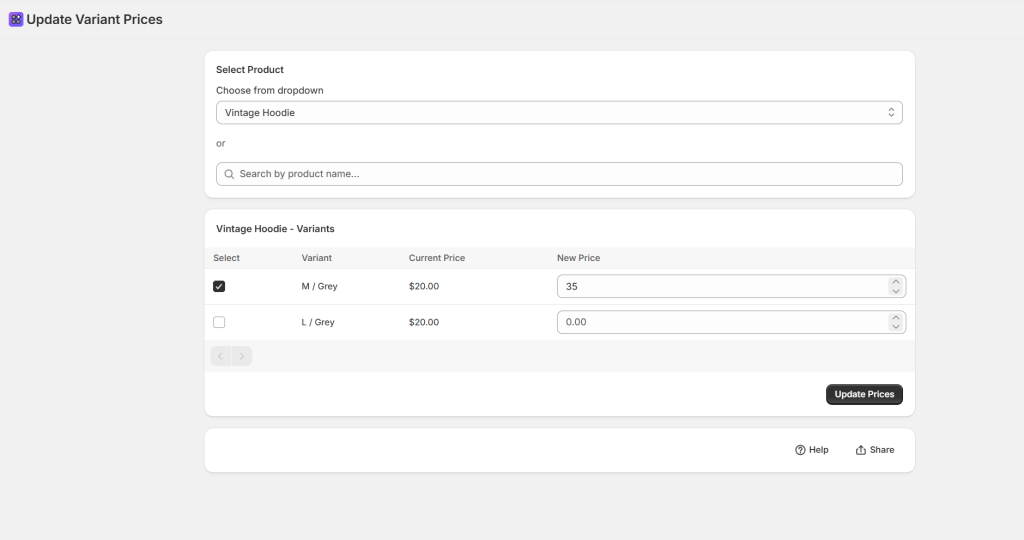
    • Dual Selection Mode: Use the search bar for speed or the dropdown to browse alphabetically.
    • Bulk Checkboxes: Only want to change the price of the “Extra Large” sizes? Check the boxes you need and leave the rest untouched.
    • Paginated for Performance: Even if you have hundreds of variants, the app handles them in 100-per-page chunks to keep things fast.
    • Real-Time Refresh: As soon as you hit “Update,” the app confirms the change and refreshes the table so you can see your live prices immediately.

    ⚠️ Warning: This app uses the productVariantsBulkUpdate mutation to push changes directly to your live store. Always double-check your “New Price” inputs before clicking Update—especially if you are adjusting high-ticket items!

    Common Questions

    Can I undo a bulk price change?

    There is no “Undo” button; you would simply run the prompt again with the previous prices. We recommend exporting a CSV of your products before any massive pricing overhauls.

    Does this update the “Compare-at Price”?

    This specific recipe focuses on the Current Price. If you want to handle sales, ask Sidekick: “Add a ‘Compare-at Price’ column to this table and include it in the update mutation.”

    Will new prices show up on my store immediately?

    Yes! Once the mutation is successful, Shopify’s cache usually updates within seconds for your customers.

    The Sidekick Challenge: What’s the biggest “pricing oops” you’ve ever had on your store? Let us know in the comments if this command center helps you sleep better at night!
  • Untangle Your Shipping: Build a Product Shipping Options Reviewer in Sidekick

    Untangle Your Shipping: Build a Product Shipping Options Reviewer in Sidekick

    Product Shipping Options Reviewer

    PREREQUISITES:

    • 90s (Two-step prompt)
    • Access: Sidekick AI
    • Plan: Grow / Advanced / Plus

    The Shipping Profile Maze

    If you’ve ever spent hours wondering why a customer can’t see the “Expedited Shipping” option for a specific product, you know the headache. Shopify’s default interface makes it difficult to see which Delivery Profiles are assigned to which products at a glance. As you add special handling profiles (hazmat, oversized, dropshipped), it becomes a tangled mess of missing profiles and redundant rules.

    The Solution: Sidekick It

    This Sidekick-powered Product Shipping Options Manager cuts through the complexity. Instead of clicking through dozens of product pages, you can build a custom app that visualizes all your products and their assigned shipping profiles. This is your command center for pinpointing exactly why a shipping option isn’t showing up at checkout.

    The Exact Prompt

    Note: This recipe works best in two stages. Follow the order below:

    Step 1: The Foundation

    I want to create an app that checks various shipping options across all of my products
    and allows me to see very quickly what products have what shipping options available.

    Step 2: The Refinement (Paste after Sidekick responds to Step 1)n

    Request these enhancements:
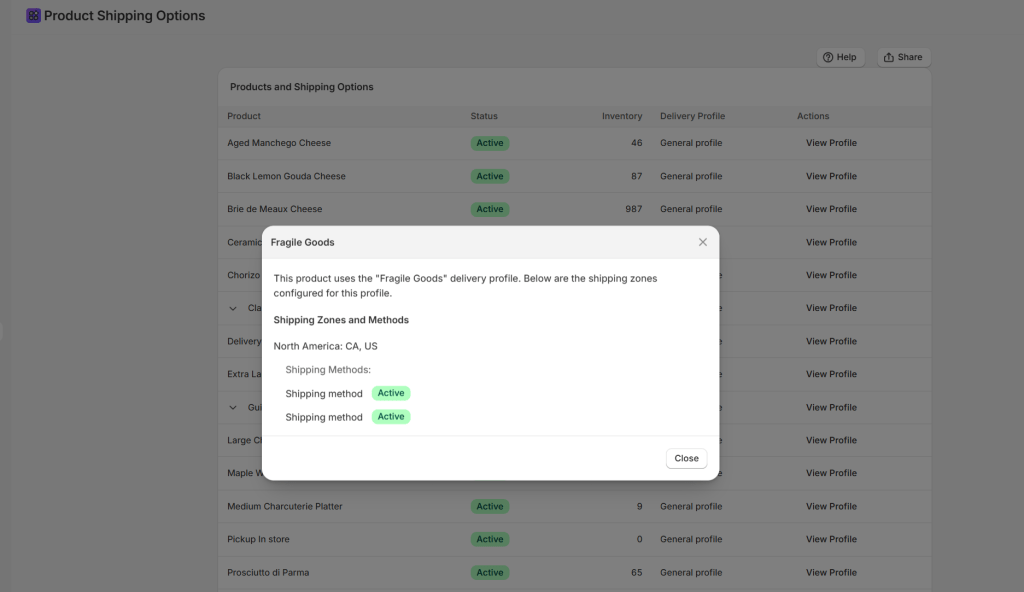
    - View delivery profile details in a modal.
    - Add Help button and Share button.
    - Add expandable rows for variants.
    - Suppress expandable rows for products with only default variants.
    - Add shipping methods and conditions to the delivery profile details.

    Triple-click the boxes above to copy the magic.

    Key Features of Your New Shipping Sidekick App

    • Comprehensive Product View: See all physical products in one scrollable, paginated table.
    • Delivery Profile Assignments: Instantly identify which profile (e.g., “Heavy Goods,” “Dropship Partner”) each item belongs to.
    • Variant-Level Detail: Expand products to see if specific variants (like your “Oversized” version) have the correct shipping rules.
    • Detailed Profile Modal: Click any profile name to see Shipping Zones, Countries, and specific Methods (Standard, Express, etc.) along with their price/weight conditions.
    • Shareable Instructions: Use the built-in “Share” button to send the logic to your logistics team.

    ⚠️ Note: This specific app is designed for visualization and auditing. It pulls data from the Delivery Profile API. While it provides incredible clarity, always perform a final test at your storefront checkout after making significant changes to your Shipping and Delivery settings.

    Common Questions

    What is a “Delivery Profile”?

    It is a set of shipping rules for specific products and locations. Shopify uses these to determine which rates to show at checkout based on what’s in the cart.

    Can this app change the assignments?

    This specific recipe is a “Manager View” for auditing. To move products, you can follow up with Sidekick and ask: “Now, add a feature to move selected products to the [Profile Name] profile.”

    Is this useful for small stores?

    Even with a “General” profile, this app is a game-changer for troubleshooting why a specific country or weight bracket isn’t triggering the correct shipping rate.

    The Sidekick Challenge: Have you ever had a “Shipping Fail” where a customer was charged $0 for a heavy item? Drop a comment below and tell us how this audit tool changed your workflow!

  • Master Dimensional Weight: Build a Shopify Product Dimensions Manager in Seconds

    Master Dimensional Weight: Build a Shopify Product Dimensions Manager in Seconds

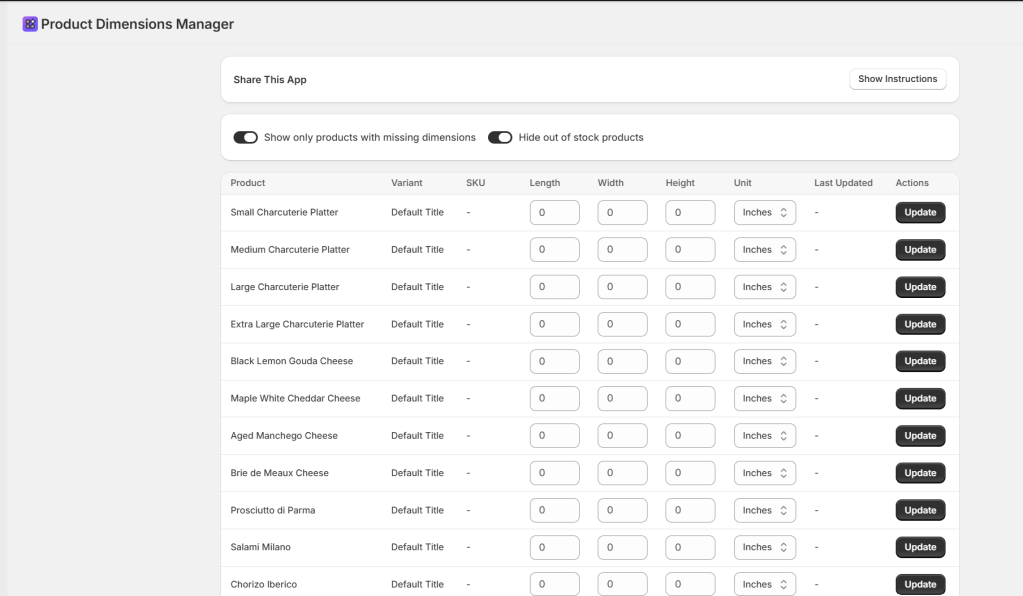
    Product Dimensions Manager

    PREREQUISITES:

    • Time: 60s
    • Access: Shopify Sidekick AI
    • Plan: Grow / Advanced / Plus

    The “Dim Weight” Trap

    Have you ever been shocked by a shipping invoice that was double what you quoted a customer? Welcome to the world of Dimensional Weight. Carriers like Canada Post, UPS, and FedEx don’t just care how much a box weighs; they care how much space it takes up. If you ship a 1lb pillow in a large box, you’ll be charged for the space, not the weight. If you aren’t tracking Length, Width, and Height, you’re flying blind.

    The Solution: Sidekick It

    Today, we’re using Shopify Sidekick to build a custom Product Dimensions Manager. This app creates a central dashboard to audit your entire catalog and save dimensions as Metafields—without needing a third-party paid app. By tracking these in Shopify, you can provide accurate data to 3PLs and use advanced apps to calculate exact box fits.

    The Exact Prompt

    Create a brand new Product Dimensions Manager app.
    The app should:
    - Display physical products that require shipping in a table.
    - Show columns for: Product name, Variant, SKU, Length, Width, Height,
    Dimension Unit selector (Inches, Centimeters, Meters, Feet),
    Last Updated, and an Update button.
    Include filter toggles:
    1. "Show only products with missing dimensions"
    2. "Hide out of stock products"
    Logic:
    - Allow users to enter L, W, and H values and select units.
    - Store dimensions as custom metafields using the productVariantsBulkUpdate mutation.
    - Show a "Last Updated" column for tracking modifications.
    - Include a Share button with instructions in an expandable section.
    Keep it simple and functional.

    Triple-click the box above to copy the magic.

    Key Features of Your New App

    • Metafield Integration: Automatically creates and updates Metafields in the sidekick namespace (length, width, height).
    • Smart Filtering: Instantly isolate products that are missing data or hide out-of-stock items.
    • Bulk-Ready Table: Update your L x W x H and Unit (Inches/CM) on one screen.
    • Data Validation: Prevents “fat-finger” typos by ensuring only numbers are entered for dimensions.

    ⚠️ Technical Note: The data saved by this app is stored as Variant Metafields (Key: sidekick.length, sidekick.width, etc.). Ensure your shipping or 3PL software is configured to read these specific metafield keys for automated calculations..”

    Common Questions

    Why store dimensions as Metafields?.

    Shopify’s core product fields don’t include L x W x H by default. Metafields are the standard way to store this extra data so other apps and carriers can access it

    Sidekick Challenge” question to encourage comments.

    Can I change the units later?

    Yes! The app includes a unit selector (Inches, CM, etc.). If you switch units, the app will update the sidekick.dimension_unit metafield accordingly.

    Is there a limit to how many products I can update?

    The productVariantsBulkUpdate mutation is very efficient, but if you have thousands of variants, Sidekick may process them in batches.

    The Sidekick Challenge: Check your last UPS or FedEx bill. How much did “Dimensional Weight” cost you this month? Let us know in the comments if this tool helped you bridge the gap!