Category: Product

  • Stop Manual Tagging: Build a Bulk Manager in 120 Seconds

    Stop Manual Tagging: Build a Bulk Manager in 120 Seconds

    Product Tag Manager

    PREREQUISITES:

    • Time: 120s
    • Access: Shopify Sidekick / Admin API
    • Impact: Catalog Architecture

    The Tagging Trap.

    Standard Shopify bulk editing is a nightmare for precision work. You can’t see collection memberships and tags in one view, and tagging individual variants (like specific materials or seasonal colors) usually requires a monthly app subscription or hours of manual clicking. When your catalog hits “scale,” manual organization becomes a full-time job you didn’t sign up for.

    The Sidekick Solution: “The Central Command”

    This prompt acts as your Administrative Equalizer. It builds a comprehensive dashboard inside your Admin using Preact and Polaris. It provides a “God-mode” view of your store, allowing for variant-level tagging, manual collection mapping, and high-speed sorting—all within a native-feeling, paginated interface that handles large catalogs with ease.

    The Recipe

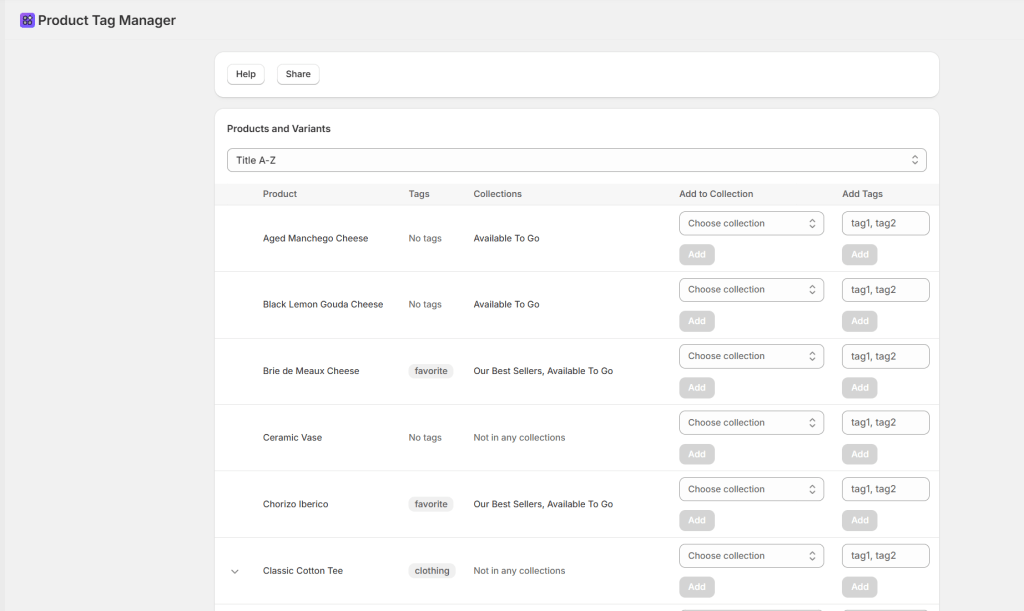
    "Create an app that lets me add tags to existing products in my store.
    It should show products in a table with their current tags and collections.
    Products should be expandable to show variants, but only if they have multiple variants or custom variant titles (not just 'Default Title').
    Allow me to add new tags to both products and variants using comma-separated input.
    Include a dropdown to add products to existing manual collections.
    Add sorting options: Title A-Z, Title Z-A, Newest first, Oldest first.
    When variants are expanded, they should align with the product table columns. Include Help and Share buttons that open modals with usage instructions and app information.
    The Share modal should include the exact prompt to recreate the app."

    Triple-click to copy the prompt.

    What This App Does

    • Smart Variant Management: Automatically hides the “Expand” option for single-variant products to keep your workspace clean.
    • Flexible Sorting: Instant toggle between Alphabetical (A-Z/Z-A) and Chronological (Newest/Oldest) views.
    • Granular Control: Apply comma-separated tags to specific variants or parent products simultaneously.
    • Pro-Level Pagination: Seamlessly navigate large catalogs (25 products per page) without losing your sort settings.

    “This prompt utilizes tagsAdd and collectionAddProductsV2 to modify live database entries. This app only works with manual collections, not smart collections.”
    Test the ‘Expandable Row’ feature on a single test product before bulk execution.

    Common Questions

    Do I need to create tags in the Shopify Admin first?

    No. Tags are created automatically as you type them into the bulk input field—no pre-setup required.

    Does this support Smart Collections?

    No, this tool is specifically designed for Manual Collections. Automated collections are handled by Shopify’s internal logic.

    Sidekick Challenge:How many hours a week do you spend on catalog organization? Tell me in the comments and I’ll help you refine this prompt for your specific workflow!!

  • Kill the Pricing Headache: Build a Bulk Variant Price Updater in 60 Seconds

    Kill the Pricing Headache: Build a Bulk Variant Price Updater in 60 Seconds

    Product Variant Pricing Manager

    PREREQUISITES:

    • Time: 60s
    • Access: Sidekick AI
    • Plan: Grow / Advanced / Plus

    The “Click-and-Wait” Fatigue

    Shopify’s native bulk editor is powerful, but it’s a chore when you need to change prices for a single product with 50+ variants. Whether you’re prepping for a flash sale or adjusting for inflation, you shouldn’t have to hunt through columns or wait for massive tables to load just to change a “Large / Red” variant from $20 to $25.

    The Solution: Sidekick It

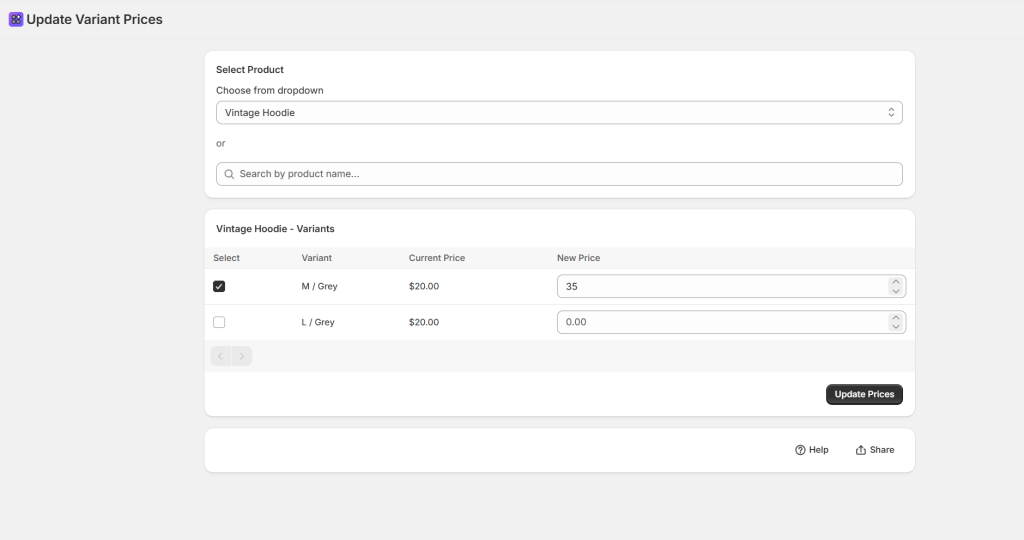
    We are sharing a recipe for a Variant Price Updater. This app gives you a focused “Command Center.” You search for a product, see every variant on one screen, and update prices in bulk with a single click. No spreadsheets, no hunting for columns—just fast, secure pricing updates.

    The Exact Prompt

    Create a brand new Variant Price Updater app.
    The app should:
    - Provide BOTH a dropdown menu (loading up to 250 products alphabetically)
    AND a search field for product selection.
    - Display all variants for the selected product in a paginated table
    (100 variants per page).
    - Show columns for: Checkbox (for selection), Variant name (showing option
    values like "Small / Red"), Current Price, New Price input field.
    Logic:
    - Allow users to select multiple variants and enter new prices.
    - Include an "Update Prices" button that uses the productVariantsBulkUpdate
    mutation to update selected variants.
    - Show success/error messages and refresh the table after updates.
    - Include separate Help and Share buttons.
    Keep it simple and functional.

    Triple-click the box above to copy the magic.

    Key Features of Your New Price Updater

    • Dual Selection Mode: Use the search bar for speed or the dropdown to browse alphabetically.
    • Bulk Checkboxes: Only want to change the price of the “Extra Large” sizes? Check the boxes you need and leave the rest untouched.
    • Paginated for Performance: Even if you have hundreds of variants, the app handles them in 100-per-page chunks to keep things fast.
    • Real-Time Refresh: As soon as you hit “Update,” the app confirms the change and refreshes the table so you can see your live prices immediately.

    ⚠️ Warning: This app uses the productVariantsBulkUpdate mutation to push changes directly to your live store. Always double-check your “New Price” inputs before clicking Update—especially if you are adjusting high-ticket items!

    Common Questions

    Can I undo a bulk price change?

    There is no “Undo” button; you would simply run the prompt again with the previous prices. We recommend exporting a CSV of your products before any massive pricing overhauls.

    Does this update the “Compare-at Price”?

    This specific recipe focuses on the Current Price. If you want to handle sales, ask Sidekick: “Add a ‘Compare-at Price’ column to this table and include it in the update mutation.”

    Will new prices show up on my store immediately?

    Yes! Once the mutation is successful, Shopify’s cache usually updates within seconds for your customers.

    The Sidekick Challenge: What’s the biggest “pricing oops” you’ve ever had on your store? Let us know in the comments if this command center helps you sleep better at night!