PREREQUISITES:
- Time: 90s
- Access: Sidekick AI
- Impact: High
The “Single Item” Ceiling
High-volume stores know that the secret to scaling isn’t just getting more customers—it’s getting current customers to buy more. Encouraging “Stock Up and Save” behavior is difficult if you’re manually managing complex discount codes or using apps that clutter your product pages. If you aren’t rewarding bulk purchases, you’re missing out on a massive opportunity to lower your shipping-cost-to-revenue ratio and skyrocket your AOV.
The Solution: Sidekick It
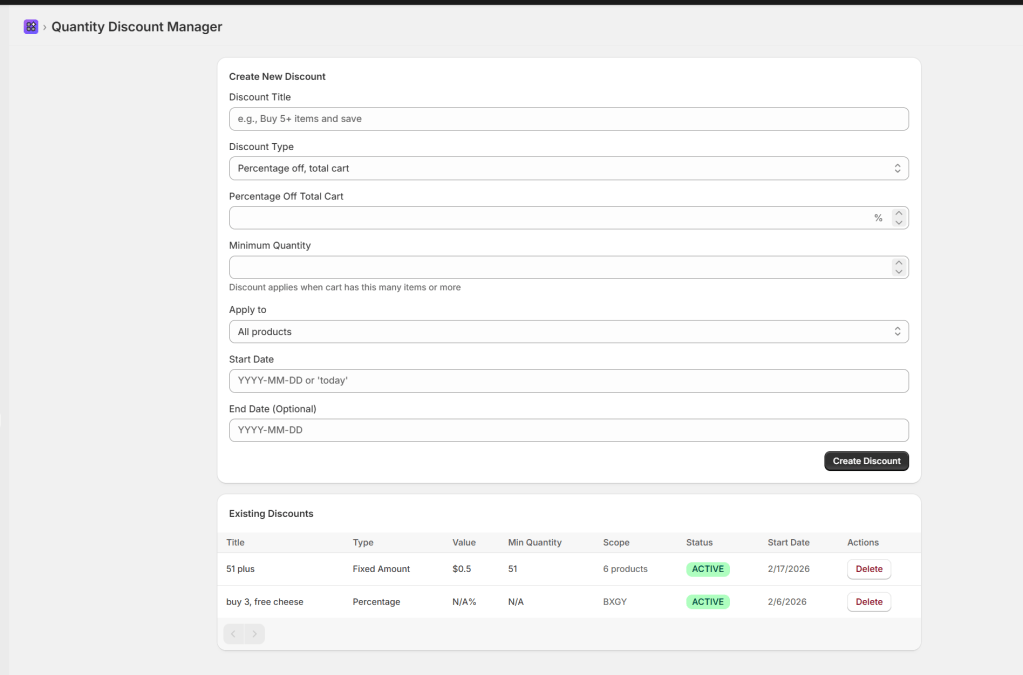
Today, we are building the Quantity Discount Manager. This app gives you a dedicated command center to create and manage automatic tiered pricing. Whether you want to offer “$10 off when you buy 3” or “20% off the whole cart at a 5-item threshold,” this tool handles the logic. It allows you to target specific products, collections, or the entire store, all while syncing directly with Shopify’s native Automatic Discount engine.
The Exact Prompt
Create a custom Shopify admin app called "Quantity Discount Manager" with the following features:1. CREATE DISCOUNTS:Fields for Discount Title, Type (4 options: % off cart, % off item, $ off cart, $ off item), Value, and Min Quantity."Apply to" scope: All products, Specific products (searchable picker), or Specific collections (searchable picker).Start Date (supports "today") and optional End Date.2. DISCOUNT LIST TABLE:Display ALL automatic discounts (Basic, BXGY, Free Shipping) in a paginated table (25 per page).Columns: Title, Type, Value, Min Quantity, Scope, Status, Start Date, and Actions (Delete).3. TECHNICAL & VALIDATION:Use discountAutomaticBasicCreate mutation; send minimum quantity as a STRING.Use automaticDiscountNodes query to fetch all types.Required fields: Title, Value > 0, Min Quantity >= 1.Percentage cap at 100%; End date validation.Include Success/Error banners and loading states on all buttons.
Triple-click the box above to copy the magic.
How It Works
- Rule Definition: You set a “Trigger” (e.g., 3 items) and a “Reward” (e.g., 15% off, or $1 off per item).
- Targeting: You choose whether this applies to your entire catalog or a specific “Bulk Buy” collection.
- Native Integration: The app uses Shopify’s
discountAutomaticBasicCreateAPI. This means the discount is applied automatically at checkout without the customer needing to type a code. - Centralized Audit: The dashboard lets you see your new quantity rules alongside your existing Shopify “Buy X Get Y” or Free Shipping rules for a full bird’s-eye view.
Technical Note:
Unique Titles Shopify requires every Automatic Discount to have a unique title. If you try to name two different rules “Bulk Savings,” the API will return an error. Be descriptive: e.g., “T-Shirt Bundle – 3 Items.”
Caution: Stacking Logic
Shopify typically only applies one automatic discount at a time (the best deal for the customer). If you have a site-wide “10% off everything” and a “Buy 3 get 20% off,” Shopify will pick the winner. Ensure your quantity discounts are enticing enough to overrule smaller site-wide promos. The exception being if you have set up a free gift rule using the GWP Automator recipe on this site. That will still stack for you!
Troubleshooting & Best Practices
- Date Formatting: If you aren’t using the “today” shortcut, ensure your date is in
YYYY-MM-DDformat to satisfy the Shopify API. - The “Total Cart” Rule: Currently, the minimum quantity checks the total number of qualifying items in the cart. If you target a “Summer Collection” with a 3-item minimum, any combination of 3 items from that collection will trigger the deal.
- Editing Rules: To prevent data conflicts, this app is “Create/Delete” only. If you need to change a 20% discount to 25%, simply delete the old rule and recreate it.
- Zero-Value Errors: Always ensure your discount value is greater than 0. The app will block “0%” or “$0” entries to prevent checkout glitches.
Common Questions
Can I offer “Buy 2 get 1 free” with this app?
This specific manager handles Basic discounts (percentage or amount off). While it displays your “Buy X Get Y” rules in the table for reference, you should use the native Shopify admin to create BXGY rules, then use this app to manage your tiered pricing.
Does the customer see the discount on the product page?
Because these are “Automatic Discounts,” they are natively calculated in the cart and at checkout. To show them on the product page, we recommend adding a “Bulk Savings” section to your product description or a theme announcement bar.
Can I limit this to just one specific variant?
Yes! When using the “Specific Products” scope, the searchable picker allows you to select the products that qualify for the quantity trigger.
The Sidekick Challenge: Identify your “slowest” moving collection. Create a “Buy 4, Get 20% Off” rule for that collection specifically and watch your inventory turn over faster this month!
 Every Shopify Hero Needs a Sidekick.
Leave a comment